
Architecture
WBengine is a request-driven PHP framework with a visible object tree. It keeps site structure and content in MySQL, reusable behavior in namespaced PHP boxes, and presentation in templates.
The object tree
- Application is the root of one HTTP request. It loads configuration and provides shared services such as database access, routing, authentication, rendering, Markdown and cache. Services are created lazily when used.
- Site is the page selected for the current URL. It carries the site row, locale, access rules, metadata and navigation context.
- Section is a named region in the page layout, for example
header,centralorfooter. - Box is a small application component selected by a
cms_boxesrow. Its configured module and method map to a class in the application namespace, such asApp\Box\Central\Docs. - Model contains reusable data access for a box. It uses the framework database layer and bound SQL parameters.
- Renderer and template turn the box data into output. Templates use the framework renderer; they do not replace the PHP object tree.
The parent links are real object references: a box can reach its section, site and application without a second global container. Keep new PHP features in the existing tree and namespaces. Do not put credentials or database logic in templates.
One request from URL to HTML
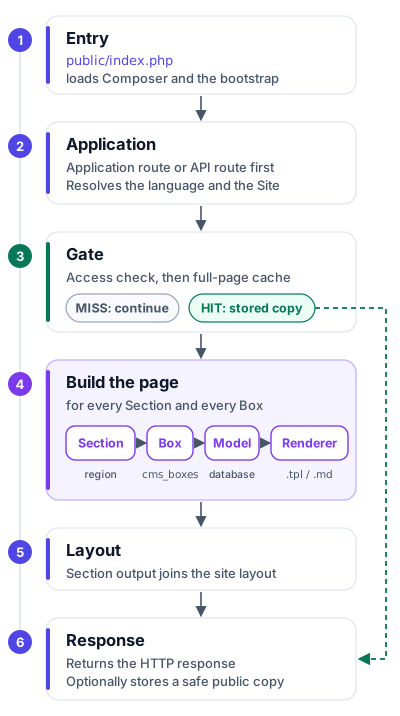
- Entry.
public/index.phploads Composer and the application bootstrap. - Application. It serves an explicit application route or an enabled API route first, then resolves the language and matches the request to a Site.
- Gate. It checks access and whether a safe full-page cache entry can answer. A hit sends the stored copy and skips the rest.
- Build. It loads the active Sections of the Site. Each Section reads its configured Boxes. A Box is created with its parent objects, calls a Model when it needs database content, and the Renderer processes a
.tplfile or a.mdsource. - Layout. The output of the sections is combined in the site layout.
- Response. The HTTP response is returned and a safe public copy of the page is optionally stored.
The exact route and cache gates depend on application settings. The framework handles matching, access and rendering; application classes define what each box does.
What lives in the database and in PHP
cms_sites describes URLs and page metadata. cms_sections defines layout regions. cms_boxes attaches a module and method to a section, controls order and can mark a box as shared. Article, menu and translation tables hold editable content. PHP classes provide behavior, models query data, and templates present it. An existing box can often be attached to a new site through data alone; new behavior requires an application box class.
How to extend a site
For a content-only page, use an existing article or registered box and configure its site, section and box rows. For new behavior, add a class beneath App\Box\<Section>, extend Wbengine\Box\WbengineBoxAbstract, and use its parent accessors. Put reusable queries in a model and render a .tpl or .md source. The Boxes guide walks through the code and database mapping.
Markdown, templates, locales, caching and the server-to-server API v2 are described in their own guides. The optional central administration is a separate application connected through API v2; it is not part of the PHP request tree or Composer package.